GeocachingTeam Markwell LogoGeodashing
FAQ Update - Pocket Queries

Back to Team Markwell's Home
Back to the FAQ


Known Issues with PQ
As of Jul 17 2009
Using "Home" Coordinates and selecting a geographical region (like a state or country) causes strange errors. Instead, use zip code, a nearby cache, or type in the actual coordiantes of your home.
It is completely possible to set up "mutually exclusive" criteria, meaning that no single cache can POSSIBLY match the criteria (for example: "I have found" and "I haven't found" - no one cache matches that).
Pocket Queries: A Detailed Explanation
Click on a topic below

What are Pocket Queries?
  1. Step 1: Decide What You Want
  2. Step 2: Setting up the Criteria
  3. Step 3: Submitting
  4. Step 4: Testing
  5. Step 5: Running the Query and Receiving Results
  6. Step 6: What do I do now?


What are Pocket Queries?
Most likely, you came here from my Main FAQ, but if you didn't, here's the explanation from that page:
Pocket Queries are just one example of the benefits of subscribing as a premium member of Geocaching.com. Becoming a premium member helps defray the cost of the servers and maintenance (and development) for the Geocaching.com database, but there are perks to being a premium member as well. As quoted on the site:
Premium Member Services
  • You now have the ability to create Pocket Queries. A Pocket Query allows you to have a list of caches from a customized search, generate a waypoint file for loading into your GPS. If you haven't already, visit the Pocket Query Generator to learn more.
  • You can customize your title to whatever you want in the forums. Your title is listed below your name when you post a message to the forums.

So - Pocket Queries allow you to get a subset of caches e-mailed directly to you. For example, do you like only traditional caches and don't really care about Virtual Caches? Pocket queries can e-mail you you a set of traditional caches that you haven't found within 100 miles from your home coordinates in one of two formats readable by EasyGPS or ExpertGPS or various other home grown software. These computer files can then be loaded directly into your GPS via a connecting cable. You can search by proximity to a set of coordinates (your home?) or for caches within a geographical boundary (your state/country).

You mention various formats? What formats can I receive this data in?
  • The first is a LOC file (a file with the extension LOC on the end). This is currently the default file type that Geocaching.com uses when exporting information from the website into a format that can be directly loaded to your GPS. All you need is some software that can read LOC files (EasyGPS (free) or ExpertGPS (fee) are two) and a cable from your computer to your GPS.
  • Want to see the difference between LOC and GPX?
    Click here
    The second is a GPX file. This is similar to a LOC file, but the file contains much more information, including some information about the logs on the cache, whether or not there's a travel bug, etc. GPX files can also be run with the most current versions of EasyGPS or ExpertGPS, but there's also an abundance of new software being written by cachers to interpret these files.
Do I need a Palm device to use this feature?
Definitely not. The GPX and LOC are for use with software and your GPS. And you can use software like GPXSpinner and Plucker to create files that are viewable on handheld devices.

How often can I get the cache lists e-mailed to me?
Once daily, and up to every day of the week if you so desire (or only on specific days). This reduces the load on the Geocaching.com servers, especially since the program to create these files is run in the middle of the night in the US, when the servers see their least amount of traffic.

How many different queries can I have?
You can save 40 separate sets of criteria, but you can only set 5 of them to be mailed to you on each calendar day (per premium membership).

Is there a maximum number of caches on the list, or could I just query the entire US?
Each query will return a maximum number of 500 caches. This is also typically the maximum number of waypoints that a GPS will store.

Examples of Uses of Pocket Queries
  • Providing a list of caches that you have not found within 100 miles of home.
  • Providing a list of inactive caches near you.
  • Providing a list of caches in your state that have never been found.
  • Providing a list of caches near you (found or not) that have Travel Bugs in them.
  • Having separate pocket queries for Traditional and Virtual caches so that you can change the waypoint on virtuals to VC#### instead of GC#### before they go into your GPS
  • Providing a list of caches near where you'll be staying for a business trip.
  • the list goes on and on and on...
Where can I get a list of the various "home grown" computer programs that extract the data from GPX or LOC files?
You can start off with Geocaching.com's list of software. On that page are links to several pieces of software that will manage and assist you in using GPX and LOC files. One favorite is ClayJar's program - Watcher. It is available at ClayJar's website (look for the largest number). The other one that is an extremely powerful database manager is GSAK (Geocaching Swiss Army Knife). If neither of those suit your fancy, ask for suggestions in the GPS Units and Software forum.


Back to the top.

Step 1: Decide What You Want
Deciding what you want can be relatively easy or relatively hard. Let's start off with the simplest version of a Pocket Query.


Simplest Setup
The simplest version of the pocket query puts the least amount of restrictions on what caches you'll receive. Each criteria you add is MORE restrictive, so for your first PQ, set up a non-restrictive list of caches.

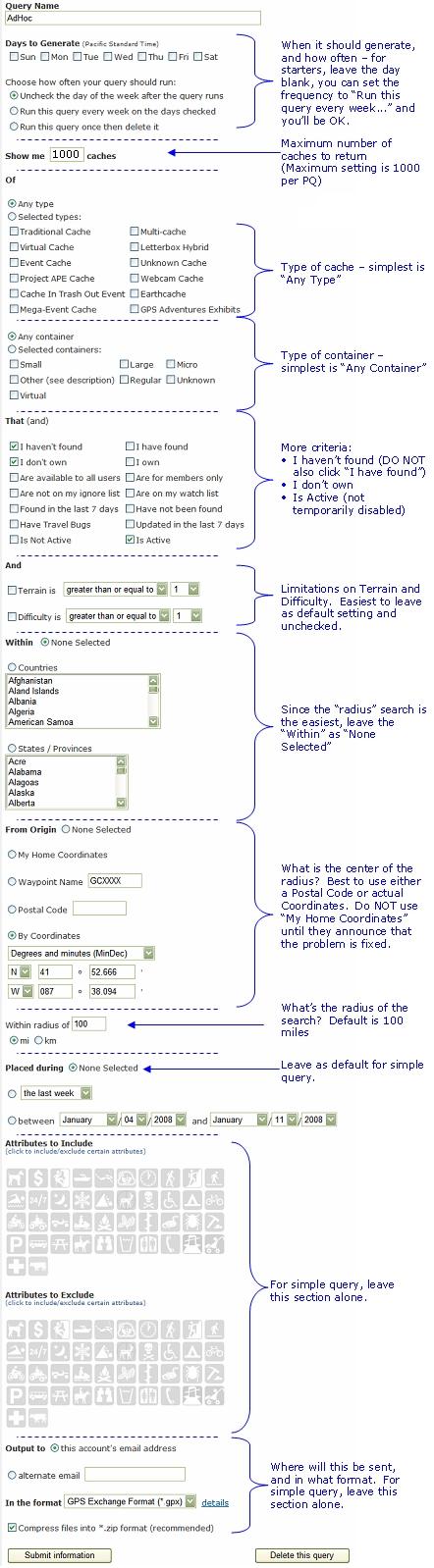
The set up to the right in the light green is how I would suggest setting up a standard first time PQ. It will give you a list of the 500 closest caches to a set of coordinates that you don't own and haven't found, and ones that are currently active (not disabled). It will also look up to 100 miles from the center coordinates. If there are more than 500 caches in that radius, the results will be the CLOSEST 500 caches.

Once you've got the criteria to the right set, click on "Submit Information" and let the page refresh. When the page reloads, you'll get this message:
Thanks! Your query has been modified You can preview the search on the nearest cache page.
Click the preview to see how many caches you'll be getting. If it's "no caches" - check the criteria again.

Once you're happy with the results, check a day of the week to run (best to select yesterday, today and tomorrow) and the results should be e-mailed to you within minutes.
Days to Generate
  • Don't select a day to run (yet)
  • Change to "Run This Query Every Week..."
Show Me
  • 500 Caches (that's the max)
Of
  • Any type
  • Any Container
That
  • I haven't found
  • I don't own
  • Is Active
And
  • Terrain unchecked
  • Difficulty unchecked
Within
  • Countries unchecked
  • States unchecked
From Origin (unchecked)
  • My Home Coordinates
    Leave unchecked (problem in system)
  • Waypoint name
    (OK to use)
  • Postal Code
    (OK to use)
  • By Coordinates
    (Best to use)
Placed During (unchecked)
Attributes to Include (leave alone)
Attributes to Exclude (leave alone)
Output to (leave alone)
To see the setup in a graphical format, Click Here or the image to the right.


More Complex Talk about AND and OR, and how to choose criteria
First, we need a lesson in computer language and logic.

In the image to the right are two major groups of objects - let's say red berries and blue berries. There's also a group of hybrid purple berries, which can be considered red berries. That same group of hybrid purple berries can also be considered blue berries.

In computer and mathematical logic, if you state that you want blue berries AND red berries, you'll get back the results that match BOTH sets of criteria - only the purple berries. In other words, using "AND" makes it so that each individual result in your much match ALL of the criteria you specify.

If you want to truly capture the entire set of berries, the computer/math logic word is "OR" - as in the berries that are red OR blue. That will give you red, blue and purple berries.


While this may seem strange to bring up in pocket queries, understanding this is essential to getting exactly what you're looking for. The single biggest mistake in PQs is putting too many limiting criteria on the data, and getting no results. If you look for caches that you HAVE FOUND AND caches that you HAVEN'T FOUND, you'll get back a result of no caches. Using AND means that the individual cache must meet both criteria, and you can't have a single cache that you both have found and haven't found.

So, what do you want? Caches within 50 miles that you haven't found? Remember that there's an upper limit of 500 caches returned in the PQ. In densely cached areas, this might be a problem. Don't like locationless caches? If you're doing a proximity search from a set of coordinates they shouldn't show up, but if you're doing a search by a region (state, country), they might show up unless you specifically exclude them.

We're going to use a hypothetical query for the purposes of education. We're going to specifically look around my home coordinates (roughly N 41° 38.500 W 088° 13.500) and look for nearby (within 50 miles) new (placed in the last month) single stage caches that I haven't found, that also contain a Travel Bug.


Back to the top.

Step 2: Setting up the Criteria
The first step is, of course, making sure you're a premium member and that you can get to the site Geocaching.com/pocket and see the list. Remember that you can have up to 20 saved versions of PQs, and have the results of 5 queries sent directly to your e-mail box in a 24 hour period. You can have some PQs that are set up as criteria, but that never run except for when you click "Preview." I ALWAYS recommend that when you're setting up a new PQ, you do not have it run immediately on the current day. Test out the results (we'll get to that) before you have them e-mailed and you shouldn't be disappointed.

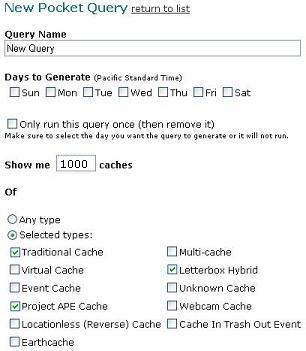
From the /Pocket page, click Create a new query and you'll have a page that looks like the image to the right.
  1. Fill in the new name (something you'll recognize in an e-mail)

  2. Do NOT select any days to run (yet). This has to do with testing the data prior to getting it e-mailed to you.

  3. Don't click "Only run once" (yet). This has to do with testing the data prior to getting it e-mailed to you.

  4. Show me X number of caches. The maximum number is 500. I usually set that to 500 and use offline software to limit by proximity.

  5. Of... (type) If you're looking for ANY caches, select ANY and you're done with this section. For the purposes of our hypothetical search, we're looking for single stage caches - which would include Traditional OR Project APE OR Letterbox Hybrids.
    • Virtuals won't have Travel Bugs
    • Event Caches aren't single stage caches (but they can have Bugs)
    • Earthcaches are akin to virtuals
    • Locationless caches won't be proximity searches (and I don't think they can hold travel bugs)
    • Multi-caches aren't single stage caches
    • Unknown caches typically fall into the multi-stage aspect of being puzzles
    • Webcams are akin to virtuals and won't have travel bugs sitting in a container
    • CITOs events aren't single stage caches.
Scrolling down...
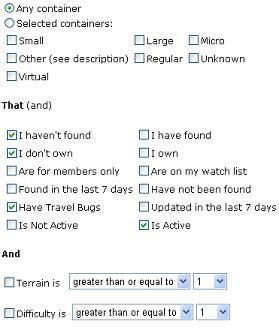
  1. Any container that's fine to leave as is.

  2. That (and) Here's where it gets tricky. Remember that every one of these that you click limits the data MORE. Hypothetically, we're looking at...
    • Caches I haven't found
    • I don't own
    • Have Travel Bugs
    • Is Active
  3. Terrain and Difficulty For our demonstration, you can leave these as is. If you're looking to limit it, use the drop downs.
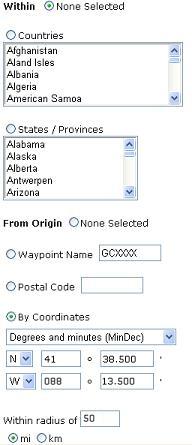
This is the proximity or region section. For the purposes of demonstration, we're going to do a proximity search. I'll talk about regional searches in the section on Multiple Regions.
  1. Leave Within unchecked for this example.

  2. From origin Since I know the coordinates that I'm searching from, I can click the By Coordinates and enter in N 41° 38.500 W 088° 13.500

  3. Within a radius of... Again - our hypothetical was for 50 miles, so I filled it in and made sure it said mi (miles) not km (kilometers).
Attributes
This is murky at best. Read the section on Attributes and PQs. For the most part, leave it blank unless you REALLY know what you're doing.
Almost there...
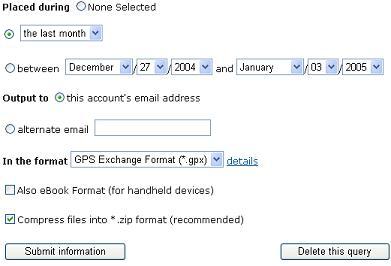
  1. Placed During Since we were specifically looking for recently placed caches (within the last month), we can use the drop down to change it to that. Make sure to click the radial circle and choose the drop-down for Last Week, Last Month or Last Year. If you just want caches placed in a certain date range, select that radial button and enter the date range.

  2. Unless you want it to go somewhere else - leave it as this account's e-mail address.

  3. As a general rule, I would ALWAYS leave the format as GPX - as it carries more information. Almost all of the programs that are out there to open LOC files can open GPX files, and if you have something like GSAK or Watcher to open the GPX file, you'll get more bang for your buck.

  4. Compress files into *.zip format (recommended) Oh yea. Check that. Your ISP (Internet Service Provider) will thank you. If you don't check it, you risk not getting your PQ because it's too big of a file, or because your ISP mistakenly thinks the text file has a virus.


Back to the top.


Attributes and PQs
Some things to remember:
  1. Each cache can only select up to 10 attributes.

  2. Most Attributes have a setting of "Attribute=YES" and a setting of "Attribute="NO" (for example: Dogs Allowed Yes or Dogs Allowed No) but some are only "YES" (for example: Boat Required).
    These are the attributes that only have the ability to choose "YES" or to leave it blank:
    Special Equipment Conditions Hazards Facilities

    Access Fee

    Rapelling

    Boat

    Scuba

    Flashlight

    Wading

    Swimming

    Livestock

    Abandoned
    Mines

    Snakes

    Ticks

    Thorns

    Falling Rocks,
    Cliff

    Hunting

    Dangerous
    Areas

    Public
    Transportation

    All other attributes have either a YES or a NO or will not be indicated.
        examples: Kid Friendly Yes:Kid Friendly No:
    Dogs Allowed Yes:Dogs Allowed No:
Dogs Allowed implies that the park specifically allows dogs and that the cache owner has thought that this is a pertinent piece of information. The cache owner has specified that as one of the 10 attributes available to their cache.
Dogs Not Allowed implies that the park specifically prohibits dogs and that the cache owner has thought that this is a pertinent piece of information. The cache owner has specified that as one of the 10 attributes available to their cache.
Niether - If the owner does not specify whether dogs are allowed or not, the owner just didn't think that this was important enough data to be included. You cannot infer from this whether they are or are not allowed.

Some notes on the Geocaching.com site:
  1. Excluding Attributes
    Previously, the "Exclude" attributes was buggy. After thorough testing, the selection process is fixed.
  2. Choosing "Attribute=No" on attributes that do not have a "=No"
    On the PQ Generator, users can choose to include or exclude attributes set to NO on attributes that don't allow a NO setting. For example, users can filter on Boat Required=No, but on each cache you can only indicate Boat Required=YES or leave it blank. Including Boat Required=NO will give you an empty result every time.
  3. Selecting more attributes to include seems to limit the data further.
    Selecting Dogs allowed may reduce the results by 25%. Additionally selecting Handicapped Accessible seems to grab only caches that have Dogs Allowed AND have Handicapped Accessible as attributes. Since any one cache can only have up to 10 attributes selected, selecting more than 10 attributes to include on the PQ generator will result in no caches.
  4. The PQ Generator also allows you to select mutually exclusive criteria
    Users can choose to include Dogs Allow=YES, and also on the same query exclude Dogs Allow=YES. Since no one cache can have both, the PQ will result in no caches.
  5. Attributes are not included in GPX files
    When attributes when live in January of 2005, Jeremy posted this quick FAQ on attributes, which included this statement:
    Will attributes be available in Pocket Queries?
    Pocket Queries will not contain the attribute information until we update the specification for the GPX to allow this info. We did create an attribute feature in 1.1 but we'll most likely change it to another version to accomodate some new ideas.
    This feature has not been implemented as of July 2009. Attributes are NOT included in the GPX file and cannot be sorted by GSAK or other offline software.


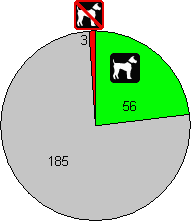
The Pocket Query Generator has the ability on its page to select which attributes to INCLUDE and which attributes to EXCLUDE. But understanding how it all works is a detailed lesson in logic. For our example, we'll look at the "Dogs Allowed" attribute. Right now, there are 244 caches within 10 miles of my home.


244 total caches
Leaving the dogs attribute out of both the INCLUDE and the EXCLUDE will give you all of the caches, regardless of this attribute. That's how I got 244. Result
244
Include
If you choose to INCLUDE only caches where the Dogs Allowed=YES attribute exists, then you will get a list of caches where the owner has explicitly indicated that dogs are allowed. In my example of 10 miles around my house, there are only 56 caches with the Dogs Allowed=YES attribute on them. Result
56
Include
If you choose to INCLUDE only caches where the Dogs Allowed=NO attribute exists, then you will get a list of caches where the owner has explicitly indicated that dogs are prohibited. In my example of 10 miles around my house, there are only 3 caches with the Dogs Allowed=NO attribute on them. Result
3
Exclude
If you choose to EXCLUDE caches where the Dogs Allowed=YES attribute exists, then you will get a list of caches that specifically do NOT have the Dogs Allowed=YES. In my example of 244 caches around my home, and 56 caches with the Dogs Allowed=YES attribute on them, that would leave 188 caches. Result
188
Exclude
If you choose to EXCLUDE caches where the Dogs Allowed=NO attribute exists, then you will get a list of caches that specifically do NOT have the Dogs Allowed=NO. In my example of 244 caches around my home, and 3 caches with the Dogs Allowed=NO attribute on them, that would leave 241 caches. Result
241

The key point to notice is that including Dogs Allowed=NO is not the same and excluding Dogs Allowed=YES.

Back to the top.

Multiple Regions
If you're doing a search for regions instead of proximity to a set of coordinates (every cache that is in Rhode Island combined with every cache in Connecticut), you can choose the State radial button, and click the first state and scroll the little list until you find the next state. Then hold down your CTRL key and click the second state.

If you want ALL states, click the first one (Alabama) and scroll down to the last one and hold the SHIFT key to click on that one (Yukon Territory). Same thing is true for countries.


Back to the top.

Step 3: Submitting
You're ready to submit your query. Submitting doesn't mean that the query will run - it just means that you're saving your criteria. You'll be taken back to the Geocaching.com/pocket page where your cache will now by listed in the grid of available and saved pocket queries.

Back to the top.

Step 4: Testing
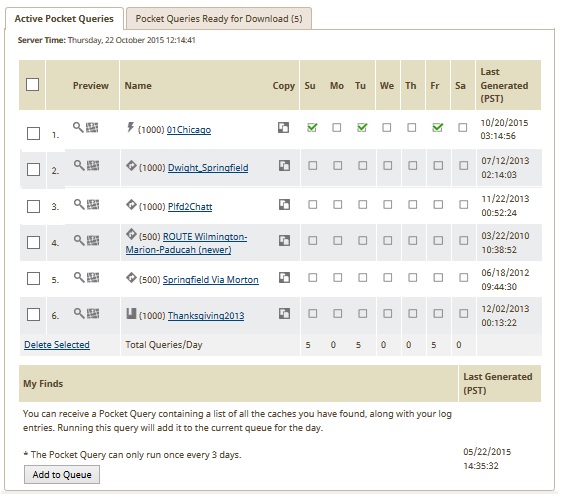
The image to the right shows a snapshot of the pocket page from my computer on January 4 2005 at about 9:00 A.M. EST. Every query has a separate row and a grid to check box which days of the week to run the query to send to an e-mail box. On the far left is the "Preview Link." Clicking that preview link on a query line will show you the results immediately for that Pocket Query. It doesn't contain the GPX information, and can only show you 20 caches at a time, but at least it lets you know what the PQ will contain prior to sending it via e-mail.

It's always a GREAT idea to preview the results of the PQ prior to committing it to send, which is why I suggest having no date selected at first.

Back to the top.

Step 5: Running the Query and Receiving Results
Once you're happy with the results of the preview, you can select a day to run. On a new query, I usually select the current day of the week and tomorrow's day of the week. That way I make sure that I should get at least one copy in the next 24 hours.

The PQ will show up in your e-mail box with the name of the PQ in the subject line. Unfortunately, as of this writing, the attached zip file (you did zip it, right?) is numeric (14204.zip) and the contents of the zip file are that same numeric name (14204.gpx). My suggestion is that once you uncompress the zip file you rename it something familiar like BugsNearHome.gpx for your own convenience.

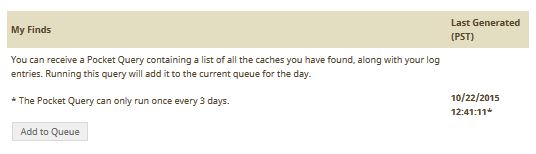
Brand new queries tend to run almost right away at Geocaching.com, so if in the next five minutes after you check the day of the week, you don't see something in your in-box, head back to the Geocaching.com/pocket page and have a look. In that snapshot still to the right, you can see that the query on the bottom is bold. That means that it ran in the last 24 hours. It also shows when the query was generated. If the query was generated and you haven't received it, you might have a problem with an overzealous spam blocker or virus protection service, or (on the far outside chance) there may be something wrong with the e-mail server at Geocaching.com. Be patient and you might also head over to the Geocaching.com discussion forum to see if anyone else is having problems. Be sure to read several of the topics before just posting something. Here's an example of a day that had some problems. Wouldn't you know it - it was the day I was trying to write this page

Back to the top.

Step 6: What do I do now?
Any number of software programs can open the GPX file you've received. Watcher is one and GSAK (Geocaching Swiss Army Knife) is another. Both are good, but GSAK does a little bit more than Watcher. With GSAK you can view an offline mock up of the cache page in a preview pane (as well as clicking to view the live one if you're online). The other added benefit of GSAK is that it can communicate with your GPS directly without having to involve another program like EasyGPS.

Back to the top.


Why can't I get my Pocket Queries?
There are a couple of things to check.
  1. Make sure your results are set to "Zip". Overzealous virus filters may kick out .gpx files, even though they cannot execute (they're just actually text files).
  2. Did you select a day to run? Even if you tell the query "run once then delete" you HAVE to select a day of the week ("Monday") for the PQ to run.
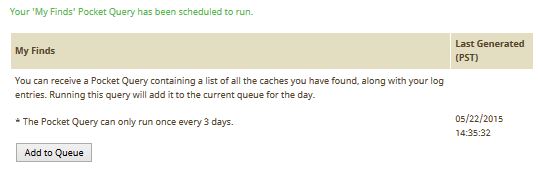
  3. Did you mistakenly click "Add to queue"? The "Add to Queue" button on the pocket query page is ONLY for getting a pocket query of all of YOUR finds.
  4. Did the query generate yet? On the Pocket Query Page in the grid, if the query has generated in the last 24 hours, it will be bold with a date. If it hasn't generated yet, it may just be waiting its turn. See the note on "priorities" below.
  5. Check your spam folder. With a subject line that looks automated and an attachment that is likely in the format of 999999.zip, some overzealous spam filters may place it there.
GC.com instituted a priority for when PQs would run. It is based on the last time the request has run. Queries that have NEVER run get first in line. Queries that ran a long time ago are next, and queries that ran just the previous day are last. If you desparately need them, the suggestion until they get a fix is to copy the query to a new one and let it run. You should get the results almost instantly.

Back to the top.

Can I get a list of Archived caches in my Pocket Queries?
Such a good question it deserves its own separate page.

Back to the top.


Tips and Tricks


Back to the top.


Last Updated: July 17 2009